I. What Is CNC Programming?
CNC programming is the process of creating machine-readable instructions for CNC equipment such as milling machines, lathes, routers, grinders, and multi-axis machining centers. These instructions guide the machine through each machining operation required to produce a part.
A CNC program tells the machine:
- where to move
- how fast to move
- which tool to use
- how deep to cut
- when to start or stop the spindle
- when to change tools
- how to repeat machining steps
The most common programming language used in CNC machining is G-code, often supported by M-codes for machine functions. Together, these codes control motion, spindle actions, coolant activation, tool changes, and many other operational details.
In practical manufacturing, CNC programming converts engineering intent into machine action. A designer may create a 3D model, but the CNC programmer determines how that model will actually be machined in the most stable, efficient, and accurate way.
For this reason, CNC programming is one of the most important links between product design and finished parts.
II. Why Is CNC Programming Important in CNC Machining?
CNC programming is not just a technical step in production. It directly affects machining quality, efficiency, and cost.
1. It Controls Part Accuracy
A poorly written program can cause dimensional errors, poor surface finish, chatter marks, tool breakage, or even scrap. A well-optimized CNC program helps ensure the machine follows the correct toolpath and produces the intended geometry.
This is especially important for precision machined parts with tight tolerances, complex contours, or critical hole positions.
2. It Improves Production Efficiency
Programming decisions affect cycle time, tool engagement, step-over, cutting order, and tool changes. Good CNC programming reduces unnecessary machine movement and improves productivity.
In both prototyping and mass production, efficient programming can significantly lower machining cost.
3. It Protects Tools and Machines
Cutting parameters such as spindle speed, feed rate, and depth of cut must match the material, tool type, and machine capability. Incorrect settings may overload the tool, damage the spindle, or create unstable cutting conditions.
4. It Supports Complex Geometry
Modern CNC programming allows manufacturers to machine complex 3D surfaces, undercuts, multi-face features, and tight-tolerance details that would be difficult or impossible with manual machining.
This is particularly valuable in 5-axis CNC machining, mold making, aerospace components, and medical parts.
5. It Enhances Repeatability
Once a CNC program is verified, it can be reused for consistent production. This makes CNC machining highly repeatable for both low-volume and high-volume manufacturing.
III. Types of CNC Programming
There is more than one way to create a CNC program. The method used depends on part complexity, production needs, and available software or machine controls.
1. Manual Programming
Manual programming involves writing G-code and M-code line by line. This method is still used for simple parts, basic drilling cycles, or straightforward turning operations.
Advantages
- full control over code
- useful for simple geometries
- no heavy software dependency
- good for small edits at the machine
Limitations
- time-consuming
- harder for complex 3D shapes
- more prone to human error
- less efficient for advanced toolpath strategies
Manual programming is often useful for experienced machinists handling simple jobs, but it is less common for complex precision components.
2. CAM Programming
CAM stands for Computer-Aided Manufacturing. In CAM programming, the programmer imports a CAD model into CAM software and generates toolpaths digitally.
This is the most common method in modern CNC machining because it supports:
- complex geometry
- simulation
- collision checking
- tool library management
- machining strategy optimization
CAM programming is widely used for milling, turning, mill-turn, and multi-axis machining.
3. Conversational Programming
Some CNC machines support conversational programming directly at the controller. Instead of writing full code manually, the programmer enters dimensions, features, and machining parameters into guided menus.
This method is suitable for:
- simple pockets
- drilling patterns
- turning features
- quick shop-floor jobs
However, it is usually not the best choice for highly complex or high-precision parts.
4. Parametric Programming
Parametric programming uses variables, formulas, and logic statements to make programs more flexible. It is very useful for part families, repeat features, and production environments where dimensions change within a controlled range.
This approach improves efficiency and reduces the need to write separate programs for similar parts.

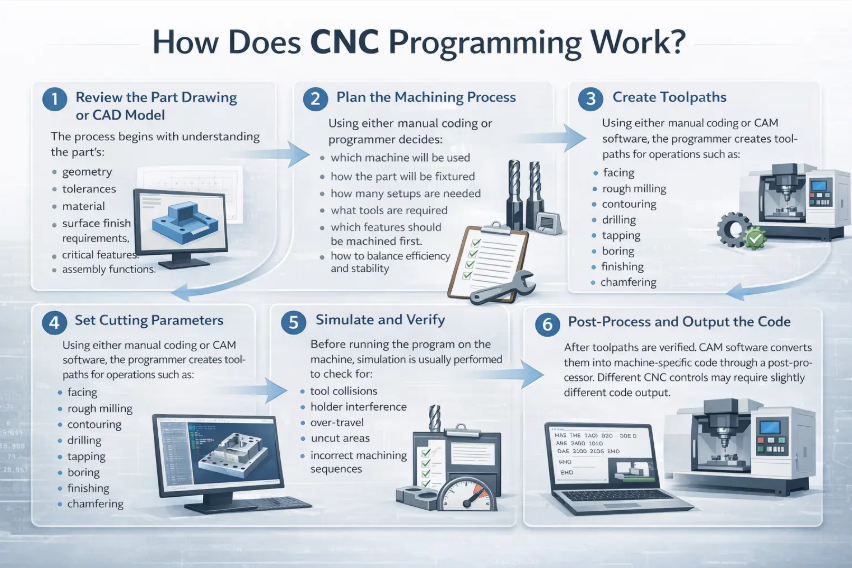
IV. How Does CNC Programming Work?
CNC programming is usually part of a larger manufacturing workflow rather than a standalone activity.
1. Review the Part Drawing or CAD Model
The process begins with understanding the part’s:
- geometry
- tolerances
- material
- surface finish requirements
- critical features
- assembly functions
At this stage, the programmer must also identify any manufacturability issues.
2. Plan the Machining Process
Before creating toolpaths, the programmer decides:
- which machine will be used
- how the part will be fixtured
- how many setups are needed
- what tools are required
- which features should be machined first
- how to balance efficiency and stability
This step is extremely important in precision CNC machining because programming is closely tied to process planning.
3. Create Toolpaths
Using either manual coding or CAM software, the programmer creates toolpaths for operations such as:
- facing
- rough milling
- contouring
- drilling
- tapping
- boring
- finishing
- chamfering
For more advanced parts, the toolpaths may include 3D surfacing, trochoidal milling, rest machining, or simultaneous 5-axis motion.
4. Set Cutting Parameters
The programmer defines:
- spindle speed
- feed rate
- depth of cut
- step-over
- entry and exit strategy
- coolant usage
- tool compensation
These values depend on material type, cutter geometry, machine rigidity, and production goals.
5. Simulate and Verify
Before running the program on the machine, simulation is usually performed to check for:
- tool collisions
- holder interference
- over-travel
- uncut areas
- incorrect machining sequences
Verification helps reduce scrap risk and improves production safety.
6. Post-Process and Output the Code
After toolpaths are verified, CAM software converts them into machine-specific code through a post-processor. Different CNC controls may require slightly different code output.
7. Test and Optimize on the Machine
Finally, the program is loaded into the CNC machine and tested. Minor edits are often made on the shop floor to improve cycle time, chip evacuation, tool wear behavior, or surface finish.

V. Key Elements of a CNC Program
To understand CNC programming better, it helps to know what a typical CNC program includes.
1. Coordinate System
A CNC machine needs a defined reference point. The program uses machine coordinates and work coordinates to locate the part and guide the tool.
2. Tool Calls
The program tells the machine which tool to use for each operation. Tool number, offset number, and tool length compensation are often included.
3. Motion Commands
Motion instructions tell the machine how the tool should move. Common examples include:
- rapid positioning
- linear cutting
- circular interpolation
- canned cycles
4. Spindle and Feed Commands
These instructions control spindle rotation speed and tool feed rate, which strongly influence cutting quality and tool life.
5. Coolant and Auxiliary Functions
Coolant on/off, spindle start/stop, and tool changes are often managed by M-codes.
6. Safety Lines and Clearance Moves
A good CNC program includes safe start positions, retract moves, and clearance heights to reduce the risk of collision.
7. Program End and Reset
At the end of the cycle, the machine is returned to a safe state for the next operation or next part.
VI. Best Practices for CNC Programming
Good CNC programming is not only about making the machine run. It is about making the process safe, efficient, and repeatable.
1. Understand the Material
Different materials require different cutting strategies. Aluminum, stainless steel, titanium, brass, copper, and engineering plastics all behave differently during machining.
For example:
- aluminum allows higher cutting speeds
- stainless steel needs better heat control
- titanium requires careful chip load management
- plastics may deform if heat is not controlled
2. Prioritize Stable Fixturing
A perfect program cannot compensate for poor workholding. The programmer must understand how the part is clamped and whether the setup can handle cutting forces.
3. Reduce Unnecessary Tool Movement
Efficient programming minimizes air cutting, excessive retracts, and redundant tool changes. This reduces cycle time and improves machine utilization.
4. Use Appropriate Toolpath Strategies
Different strategies work better for different parts:
- roughing for bulk material removal
- finishing for final surface quality
- adaptive clearing for better tool load control
- rest machining for leftover material
- high-speed toolpaths for efficiency
5. Simulate Before Cutting
Simulation should be a standard step, especially for expensive materials, tight-tolerance parts, and complex setups.
6. Keep Programs Clear and Organized
Readable programs are easier to edit, troubleshoot, and reuse. Good structure is valuable for both programmers and machine operators.
7. Optimize for Both Quality and Cost
The fastest toolpath is not always the best one. The programmer must balance cycle time with dimensional accuracy, surface finish, tool life, and process stability.
VII. CNC Programming and Precision Manufacturing
In modern precision manufacturing, CNC programming is much more than code generation. It is a problem-solving activity that directly affects the final part.
For example, when machining custom precision parts, the programmer may need to consider:
- tight tolerance control
- burr reduction
- tool deflection
- thin-wall deformation
- surface finish requirements
- inspection datum planning
- post-machining treatments
This is why experienced CNC programmers are highly valuable in industries that demand high accuracy and consistency.
CNC programming is especially important in applications such as:
- aerospace brackets and housings
- medical components
- semiconductor parts
- robotic assemblies
- mold and die components
- custom aluminum and stainless steel parts
For suppliers offering precision CNC machining services, strong programming capability is often one of the biggest competitive advantages. It allows them to machine difficult geometries, reduce setup risk, shorten lead times, and deliver more reliable quality.
At Daxin Century, CNC programming is a core part of how we deliver precision machining services. As a CNC precision machining company, we specialize in producing custom parts with strict tolerance requirements, stable quality, and efficient lead times. Our manufacturing team works closely with machining programmers, engineers, and inspectors to optimize toolpaths, improve machining efficiency, and reduce production risks before cutting begins. From prototypes to batch production, this combination of programming capability and machining experience helps us support customers looking for reliable CNC machining solutions for complex and high-precision components.
In many shops, CNC programming also works closely with:
- DFM review
- tooling selection
- fixture design
- first article inspection
- process improvement
- low-volume production optimization
That is why CNC programming should be seen as a core manufacturing capability, not just a software task.
VIII. Conclusion
So, what is CNC programming?
CNC programming is the process of creating the instructions that guide a CNC machine to manufacture a part. It defines how tools move, how material is removed, and how a digital design becomes a physical product.
In today’s CNC machining industry, programming plays a central role in part accuracy, machining efficiency, process safety, and production repeatability. Whether the work involves simple turned components or complex 5-axis machined parts, good CNC programming is essential for achieving stable and cost-effective results.
As manufacturing continues to move toward higher precision, tighter tolerances, and more complex geometries, the value of strong CNC programming will only continue to grow.
IX. FAQs
What is CNC programming in simple words?
CNC programming is the process of writing instructions that tell a CNC machine how to cut and shape a part.
What language is used in CNC programming?
The most common language is G-code, often used together with M-code for machine functions.
Is CNC programming difficult to learn?
It depends on the part complexity and the programming method. Basic CNC programming can be learned relatively quickly, but advanced programming for multi-axis machining and high-precision parts takes experience.
What is the difference between CNC programming and CNC machining?
CNC programming creates the instructions for the machine, while CNC machining is the actual physical cutting process carried out by the machine.
Is CAM software necessary for CNC programming?
Not always. Simple parts can be programmed manually or conversationally. However, CAM software is usually necessary for complex parts, 3D surfaces, and multi-axis machining.
Why is CNC programming important?
It affects part quality, machining time, tool life, production cost, and process safety.
Can one program be used for repeated production?
Yes. Once verified, a CNC program can be reused for repeat orders, which improves consistency and efficiency.